
If you’re choosing hardware for Home Assistant, three options stand out: Home Assistant Green, a Raspberry Pi 5, or an Intel N100 mini PC.
All three can run Home Assistant well. The bigger differences are cost, setup difficulty, storage, power consumption and how much room you want to expand later.
For this comparison, we’re using three realistic configurations:
- Home Assistant Green — $199
- Raspberry Pi 5 4GB complete setup — about $150
- Intel N100 mini PC — Beelink Mini S12 Pro reference configuration with 16GB DDR4-3200 RAM and a 500GB SSD; current pricing varies by configuration and seller
If you already own a suitable Raspberry Pi or mini PC, the economics change completely: hardware you already own may be the best-value place to start.
Quick answer
Home Assistant Green: Best suited to someone who wants Home Assistant to behave like an appliance. It’s the easiest of the three to set up, uses very little electricity and requires almost no hardware configuration.
Raspberry Pi 5: Best suited to DIY users, particularly if you already own one. It offers more built-in connectivity and hardware expansion than Green, but our reference configuration uses microSD storage.
Intel N100 mini PC: Best suited to users who want SSD storage and considerably more computing headroom, or who may eventually run Home Assistant alongside other self-hosted services.
Green buys simplicity. Pi buys flexibility. N100 buys headroom.
At a glance
| Feature | Home Assistant Green | Raspberry Pi 5 | Intel N100 mini PC |
|---|---|---|---|
| Reference hardware | Home Assistant Green | Pi 5 4GB complete setup | Beelink Mini S12 Pro |
| RAM | 4GB | 4GB | 16GB DDR4-3200 |
| Storage | 32GB eMMC | 32GB A2 microSD | 500GB SSD |
| Representative hardware cost | $199 | ~$150 | Varies by configuration and seller |
| Low-load power assumption | 1.7W | 3.3W | ~8.8W Notebookcheck idle average |
| 3-year electricity at $0.182/kWh | ~$8 | ~$16 | ~$42 |
| Approx. hardware + 3-year electricity | $207 | $166 | Not calculated — current hardware price varies |
| Home Tech Payoff Score | 9.3 | 8.8 | 9.2 |
About our estimates: Hardware costs are representative US-dollar comparison figures, before tax and shipping. Green uses its published $199 US MSRP; the Pi uses an approximate complete setup budget; Mini S12 Pro price varies by configuration and seller and is excluded from a fixed three-year hardware total. Electricity calculations assume continuous operation at the stated low-load power figures and $0.182/kWh. The N100 input is Notebookcheck’s independent 8.8W idle average, not a manufacturer specification. Real use varies by hardware revision, storage, peripherals/workload, and power losses.
How we’re comparing them
The cheapest hardware isn’t necessarily the best value, and the fastest hardware isn’t necessarily the best Home Assistant machine.
We use the Home Tech Payoff Score to evaluate each option across six weighted criteria:
- Long-Term Value — 25%
- Local Control — 20%
- Reliability — 20%
- Integration — 15%
- Ease of Use — 10%
- Upfront Value — 10%
For this article, we also calculate estimated electricity consumption separately. Electricity isn’t currently included in the standard Payoff Score three-year cost calculation, so we’ve kept it as supplemental analysis rather than changing the methodology for one comparison.
Home Assistant Green: best for simplicity
Home Assistant Green
Best for: Users who want the simplest dedicated Home Assistant setup
Typical price: $199
Current offer: Save 5% at Seeed Studio with code CK23H528. Offers may change.
Home Assistant Green is the most appliance-like option in this comparison.
It uses a quad-core 1.8GHz ARM processor, 4GB of LPDDR4X memory and 32GB of eMMC storage. It also includes Gigabit Ethernet and two USB 2.0 ports.
Home Assistant lists Green at $199 and publishes power consumption of approximately 1.7W at idle and 3W under load.
Green isn’t compelling because it’s the fastest machine here. It isn’t.
Its advantage is that the processor, memory, storage, enclosure, cooling, power supply and operating system are already packaged as a dedicated Home Assistant appliance.
Connect Ethernet and power, open Home Assistant in a browser and complete the onboarding process. There is no case to assemble, storage card to select or operating-system image to choose.
Where Green makes sense
Green is particularly well suited if you:
- want a dedicated Home Assistant controller
- don’t want to build or maintain a small computer
- value low power consumption
- want Home Assistant OS without managing another operating system
- don’t intend to use the machine as a general-purpose server
For a normal smart home running automations, integrations, dashboards and add-ons, the extra performance of an N100 isn’t automatically useful.
Where Green is limited
The tradeoff is expansion.
Its 4GB of RAM and 32GB eMMC are fixed, and its two USB ports are USB 2.0.
You can attach USB radios and use supported external storage options, but Green isn’t designed to become a general-purpose home server.
It also doesn’t include built-in Zigbee, Thread or Z-Wave radios, so those protocols require the appropriate external hardware.
Raspberry Pi 5: best for DIY flexibility
Raspberry Pi 5 4GB
Best for: DIY users who want flexibility or already own some of the required hardware
Complete setup: ~$150
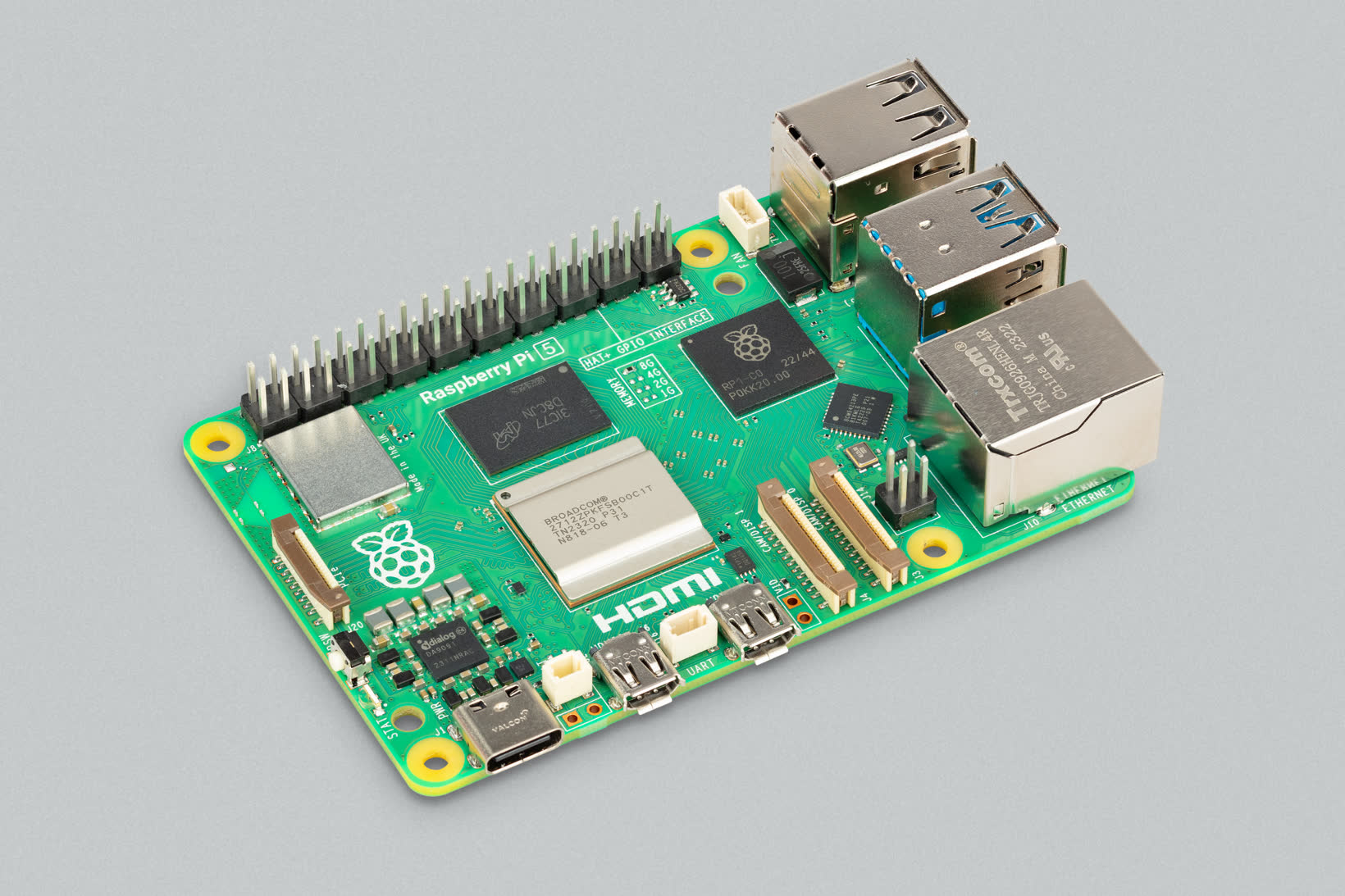
The Raspberry Pi has been one of the most popular ways to run Home Assistant for years, and the official Home Assistant Raspberry Pi installation continues to support both Raspberry Pi 4 and Raspberry Pi 5.
For this comparison, we’re using a Raspberry Pi 5 with 4GB of RAM.
But comparing only the price of the Pi board with Green or a complete mini PC would be misleading.
A working Pi installation also needs a suitable power supply and storage, and most users will want a case and appropriate cooling.
Our $150 representative cost therefore reflects a complete Pi 5 setup rather than the board alone:
- Raspberry Pi 5 4GB
- suitable power supply
- case and cooling
- 32GB A2 microSD card
Exact prices vary depending on the components you choose.
The Pi’s biggest value advantage
The Pi becomes much harder to beat if you already own one.
If you have a suitable Pi 4 or Pi 5 sitting unused, your incremental hardware cost could be close to $0.
In that situation, buying a $199 Green or a new mini PC simply to run Home Assistant may provide little financial benefit.
That matters because the goal isn’t to buy new hardware. It’s to run Home Assistant reliably.
Better built-in connectivity
The Pi 5 also provides more connectivity than Green out of the box.
The official Raspberry Pi 5 specifications list:
- Gigabit Ethernet
- Wi-Fi
- Bluetooth
- two USB 3.0 ports
- two USB 2.0 ports
- GPIO
- PCIe expansion
That makes the Pi particularly attractive to people who enjoy experimenting with hardware.
The microSD question
MicroSD is the weakest part of our baseline Pi configuration.
Home Assistant’s Raspberry Pi installation guide recommends at least 32GB of storage, ideally using an A2-rated microSD card. Storage quality matters because Home Assistant’s Recorder database performs regular writes.
That doesn’t mean every microSD installation will fail. Our Pi configuration requires the buyer to choose suitable storage and a reliable power supply, whereas Green and the reference Beelink package those components together.
A Pi 5 can also use NVMe storage with suitable hardware, providing a stronger storage configuration.
But once you add an M.2 HAT and NVMe SSD, the Pi’s total price increases and begins moving closer to complete mini-PC territory.
Intel N100 mini PC: best for expansion and self-hosting
Beelink Mini S12 Pro
Best for: Users who want SSD storage and room to expand beyond Home Assistant
An Intel N100 mini PC occupies a different position from Green and the Raspberry Pi.
It’s less like a smart-home hub and more like a small general-purpose server.
For this comparison, we’re using the Beelink Mini S12 Pro with an Intel N100 processor, 16GB DDR4-3200 RAM and a 500GB SSD as our reference N100 system. Current pricing varies by configuration and seller.
The exact mini PC you buy doesn’t need to be this model. N100 systems are available from several manufacturers and their configurations change regularly. The Beelink gives us a concrete configuration against which to compare storage and capability.
Intel’s N100 is a four-core, four-thread processor capable of boosting to 3.4GHz.
Running Home Assistant OS directly
The simplest approach is to follow Home Assistant’s generic x86-64 installation and run Home Assistant OS directly on the mini PC.
This keeps the software stack relatively simple and gives Home Assistant access to the machine’s SSD, memory and processing power. A typical installation will leave plenty of capacity unused, but you may still value the storage capacity and general-purpose computing headroom.
Running Home Assistant in a virtual machine
The other option is to use the N100 as a small virtualization server.
A platform such as Proxmox can run Home Assistant OS in a virtual machine while allowing the same physical computer to host additional services.
That can make much better use of the hardware, particularly if you’re also interested in self-hosting.
But virtualization adds another layer to maintain.
You now have a hypervisor, virtual networking, VM resources, backups and potentially USB passthrough for Zigbee, Thread or Z-Wave adapters.
Don’t install Proxmox just because an N100 can run it. Use virtualization when you actually intend to use the mini PC for more than Home Assistant.
For someone who only wants Home Assistant, bare-metal Home Assistant OS is the simpler N100 configuration.
Our Payoff Score evaluates the reference Beelink running Home Assistant OS directly. The Ease of Use score reflects the initial installation and hardware configuration; it does not include the additional complexity of optional virtualization.
Power consumption: Green wins, but electricity shouldn’t decide this alone
Home Assistant runs 24 hours a day, so power consumption is worth considering.
For this estimate, we use Green’s published idle consumption of 1.7W at 12V, 3.3W reported in testing of a Raspberry Pi 5 4GB C1 model, and Notebookcheck’s independently measured 8.8W idle average for its reviewed Mini S12 Pro.
These are approximate budgeting inputs. Green’s specification does not establish wall-socket consumption including power-adapter losses, and the Pi figure is specific to the tested hardware. The Notebookcheck N100 figure is a whole-system measurement rather than a manufacturer specification, and it must not be confused with Intel CPU TDP or an AC-adapter rating.
| Platform | Low-load power | Annual electricity | 3-year electricity |
|---|---|---|---|
| Home Assistant Green | 1.7W | $2.71 | $8.13 |
| Raspberry Pi 5 | 3.3W | $5.26 | $15.78 |
| Intel N100 mini PC | ~8.8W idle average | $14.03 | $42.09 |
These estimates assume electricity costs $0.182 per kWh. Notebookcheck also measured about 20.1W average load and 32.2W short maximum on the same Mini S12 Pro review unit; those load values are not used for the idle/low-load estimate.
Green has the lowest estimated power consumption under our assumptions.
But the dollar difference is smaller than the wattage figures make it sound.
Over three years, our Pi estimate uses only about $8 more electricity than Green, while the N100 uses about $34 more.
That’s worth knowing, but it isn’t enough to choose the hardware on electricity consumption alone.
Our estimate assigns the N100’s full electricity cost to Home Assistant. If the mini PC also runs other useful services, that cost supports several jobs. However, those additional workloads may increase power consumption beyond the idle/low-load estimate.
What does each option actually cost over three years?
Combining our representative hardware prices with the electricity estimates gives us:
| Cost item | Green | Pi 5 | N100 |
|---|---|---|---|
| Hardware | $199 | ~$150 | Current price varies by configuration and seller |
| Required subscription | $0 | $0 | $0 |
| 3-year electricity | ~$8 | ~$16 | ~$42 |
| Approx. hardware + electricity | $207 | $166 | Not calculated — current hardware price varies |
These totals cover the base hardware and estimated electricity where a fixed hardware price is available. The Pi’s $150 hardware budget already includes its power supply, case, cooling and microSD card. Protocol-specific radios, optional subscriptions, separate backup hardware and replacement parts are excluded. No subscription is required to run Home Assistant.
Price for the exact 16GB/500GB Mini S12 Pro configuration should be checked before comparing total ownership cost. The N100 still provides substantially more memory, storage and general-purpose computing capability than Green.
That can be worthwhile if you will use its storage capacity or computing headroom. If you won’t, Green’s simpler setup may matter more than the extra hardware.
The Pi remains the least expensive new system in our comparison with a fixed hardware total, at approximately $166 including three years of electricity.
If you already own a suitable Pi or mini PC, your actual cost could be considerably lower than any of these new-hardware examples.
For more comparisons focused on reducing unnecessary long-term technology costs, see our Save Money guides.
Storage and reliability
For an always-on Home Assistant system, storage reliability and recovery deserve more attention than raw processor performance.
Home Assistant Green
Green’s integrated eMMC removes the need to choose a storage card, but it isn’t as straightforward to replace as removable storage. The main advantage is a consistent, purpose-built hardware configuration.
Raspberry Pi 5
Our microSD-based Pi configuration makes storage easy to replace, but the buyer must select a suitable card and power supply. Moving to NVMe is an option with additional hardware, increasing the complete-system cost.
Intel N100 mini PC
The reference Beelink’s 500GB SSD gives more storage capacity for data or additional services.
Backups matter more than the storage argument
No storage type eliminates the need for backups.
Home Assistant’s backup tools support automatic backups, encryption and multiple backup destinations.
Whatever hardware you choose:
Don’t let the Home Assistant machine itself hold your only backup.
A hardware failure is much less disruptive when a current backup exists somewhere else.
Zigbee, Thread, Z-Wave and Bluetooth
The host computer doesn’t automatically determine which smart-home protocols Home Assistant can use.
Here’s the practical difference:
| Connectivity | Green | Pi 5 | N100 reference |
|---|---|---|---|
| Gigabit Ethernet | Yes | Yes | Yes |
| Wi-Fi | No | Yes | Yes |
| Bluetooth | No | Yes | Yes |
| USB | 2× USB 2.0 | 2× USB 3.0 + 2× USB 2.0 | Multiple |
| Zigbee built in | No | No | No |
| Thread built in | No | No | No |
| Z-Wave built in | No | No | No |
| USB smart-home adapters | Yes | Yes | Yes |
The Pi includes Wi-Fi and Bluetooth, giving it more built-in connectivity than Green. Our reference Beelink also includes both.
For the Pi, Home Assistant’s installation guide requires Ethernet during installation and recommends keeping a wired connection for reliability. Built-in Wi-Fi provides flexibility when a wired connection isn’t practical.
Green deliberately takes a simpler wired approach: Ethernet for networking and USB for additional radios.
An N100 mini PC can provide Wi-Fi, Bluetooth and multiple USB ports, but exact connectivity varies between models.
Zigbee
All three can use Zigbee with a compatible coordinator.
The computer itself doesn’t make the Zigbee mesh inherently better. Coordinator choice, placement and the quality of the Zigbee mesh usually matter more.
Z-Wave
The same principle applies to Z-Wave.
None of these three reference systems includes Z-Wave hardware, so a compatible adapter is required.
Thread and Matter
Matter isn’t itself a wireless radio.
Matter devices can communicate over Ethernet, Wi-Fi or Thread.
Matter-over-Thread devices require a Thread Border Router somewhere on the network, but that border router doesn’t necessarily have to be physically attached to the Home Assistant machine.
Bluetooth
This is one area where the Pi has a straightforward hardware advantage over Green because Bluetooth is built in.
Home Assistant also supports Bluetooth proxies, allowing compatible ESP32 devices to provide Bluetooth coverage in different parts of the home. This reduces reliance on the host computer’s Bluetooth range.
Setup difficulty and ongoing maintenance
The three systems also require different levels of initial effort.
Home Assistant Green — easiest
Green is designed specifically for Home Assistant.
Connect Ethernet and power, wait for it to boot and complete the onboarding process.
There is very little hardware decision-making involved.
Raspberry Pi 5 — easy DIY
The Pi requires more preparation.
You’ll need to assemble the hardware, install Home Assistant OS to the storage device and then boot the Pi before completing Home Assistant onboarding.
It’s still a relatively straightforward project, but there are more decisions to make than with Green.
N100 with Home Assistant OS — moderate
Installing Home Assistant OS directly on an N100 mini PC is more involved.
You’ll need to write the generic x86-64 Home Assistant OS image to the internal storage and may need to work with the mini PC’s UEFI or BIOS settings.
Once Home Assistant OS is running, normal Home Assistant maintenance is similar to the other platforms.
N100 with virtualization — advanced
Running Home Assistant as a VM introduces another platform that needs to be maintained.
That may be worthwhile if virtualization serves a real purpose, but it’s unnecessary complexity if Home Assistant is the only workload.
Which Home Assistant hardware should you choose?
There isn’t one answer that fits every smart home.
Choose Home Assistant Green if…
You want Home Assistant to behave like a dedicated appliance.
Green is particularly attractive if you value:
- simple setup
- low power consumption
- minimal hardware maintenance
- a dedicated Home Assistant system
- predictable hardware
You give up some expansion in exchange for simplicity.
Choose Raspberry Pi 5 if…
You enjoy DIY hardware and value flexibility.
The Pi makes particular sense if you:
- already own a suitable Pi
- want built-in Wi-Fi and Bluetooth
- want GPIO or PCIe expansion
- enjoy choosing and upgrading your own hardware
- don’t mind a little more setup
If you already own the hardware, the Pi can be the strongest value proposition of all three.
Choose an N100 mini PC if…
You want SSD storage capacity, more computing headroom or the option to run other services alongside Home Assistant.
An N100 becomes particularly attractive if you:
- want conventional SSD storage
- want significantly more RAM and processing headroom
- expect your needs to grow
- may eventually run additional self-hosted services
- want the option of virtualization
For a typical Home Assistant-only setup, the extra processing power is optional. Choose the N100 because its storage capacity or computing headroom serve your needs.
Already own suitable hardware?
Use it first.
Home Assistant is free and open source, and there is no requirement to buy dedicated Home Assistant hardware.
If you already own a supported Raspberry Pi, mini PC or another suitable system, try that before spending another $150–$200.
A new machine should solve an actual problem, not simply replace hardware that’s already doing the job.
Home Tech Payoff Scores
Our scores highlight the different strengths of each platform rather than identifying one universal winner.
| Payoff Score criterion | Green | Pi 5 | N100 |
|---|---|---|---|
| Long-Term Value | 8.8 | 8.4 | 9.4 |
| Local Control | 10.0 | 10.0 | 10.0 |
| Reliability | 9.5 | 8.0 | 9.2 |
| Integration | 9.5 | 9.5 | 9.5 |
| Ease of Use | 10.0 | 8.5 | 7.0 |
| Upfront Value | 7.5 | 8.5 | 8.7 |
| Home Tech Payoff Score | 9.3 | 8.8 | 9.2 |
| Classification | Exceptional Payoff | Excellent Payoff | Exceptional Payoff |
Green scores strongly on reliability and ease of use.
The Pi trades some of that simplicity for flexibility and a lower representative complete-system cost.
The N100 scores strongly on long-term and upfront value because the reference configuration provides considerably more general-purpose hardware, but its additional setup complexity works against it.
That’s why the numbers shouldn’t be treated as a simple ranking.
The bottom line
Start with suitable hardware you already own. If you’re buying new, choose the system whose storage capacity, setup requirements and computing headroom fit what you actually plan to run.
Once you’ve picked your hardware, our best smart home devices without monthly fees guide covers subscription-free products that work well with a local setup.
The payoff comes from matching the hardware to the job.